


This article was written with the help of Notion AI.
IntroductionWhat is Notion?Benefits of using Notion as a studentGetting started with NotionPricing plansDownloading NotionSetting up Notion for schoolUnderstanding the homepage and essential features of NotionBasic information on headings, pages, and the "/ "featureTaking notes in NotionKeeping your notes organizedCreating to-do listsOrganizing your studies with NotionTracking your reading and assignmentsManage your class schedule in NotionManaging income and expensesPlanning your meals in NotionTracking your goals in NotionDrafting your papers in NotionAdvanced uses of Notion for studentsManaging group projects in NotionUsing templates for recurring tasksCustomizing your Notion setupMaking your Notion setup aestheticNotion cover photosNotion resourcesNotion templates for studentsNotion integrations to get organizedConclusion
Introduction
Notion is a free note taking and productivity app that offers features to help you take notes, stay organized, and collaborate with classmates. This article will explore some ways to use Notion to boost your productivity and excel as a student.
What is Notion?
Notion is a productivity tool that allows you to customize your notes and databases to your specific needs. You can use Notion to keep track of your schedule, assignments, and notes, as well as collaborate with classmates on group projects. Notion offers a variety of features, such as databases, templates, and integrations, that can help you stay organized and productive as a student.
Benefits of using Notion as a student
Notion is versatile and customizable, allowing you to create a workspace that suits your specific needs as a student. It offers tools to help you stay organized, such as databases and templates, as well as integrations with other apps. Notion makes it easy to collaborate with classmates on group projects or study sessions, helping you streamline your workflow and get more done in less time. Finally, Notion's free version has everything you need to get started, making it an accessible and budget-friendly tool for students.
Getting started with Notion
To get started with Notion, you'll need to sign up for an account. Notion offers a free plan, which is a great way to get started. You can also opt for a paid plan if you need more features. Once you've signed up, you can start exploring Notion's various features.
Pricing plans
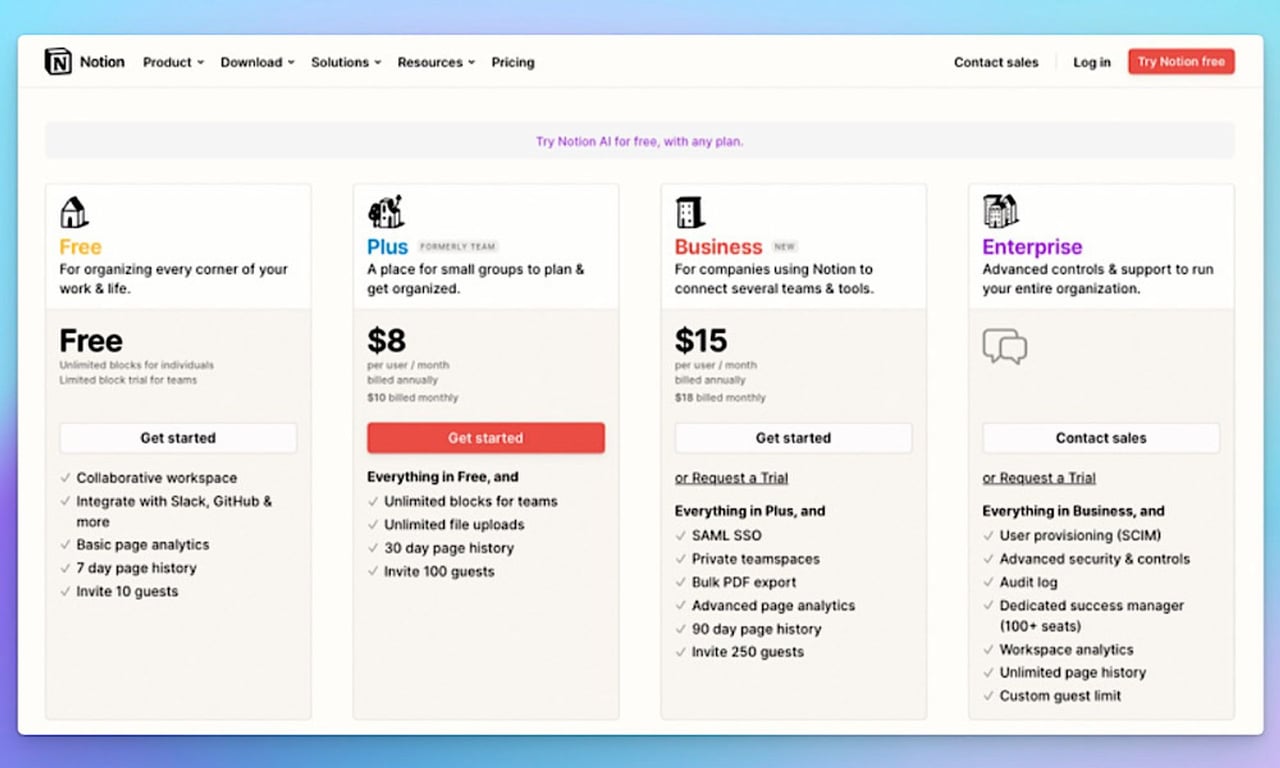
Notion offers both a free and paid version of their platform. The free version includes unlimited pages, up to 1,000 blocks of content per page, and access to Notion's basic integrations with other apps. The paid version, called Notion Personal, starts at $4 per month and includes additional features such as unlimited blocks, access to premium integrations, and increased file upload limits. Notion also offers a team plan for businesses and organizations, which includes features such as team collaboration, version history, and access controls.
Downloading Notion
To get started with Notion, you can download the desktop app for Windows or Mac, or use the web version by visiting Notion's website. Notion also offers mobile apps for iOS and Android, which can be downloaded from the App Store or Google Play. Once you've downloaded the app or logged in to the web version, you can start exploring Notion's various features and customizing your workspace to suit your needs as a student.
Setting up Notion for school

Getting set up in Notion is easy. You can create pages for different subjects or projects, which can then be organized into folders. Use Notion's database feature to create custom databases for each class or subject, to store notes, assignments, and other information. You can take notes by creating pages for different subjects, adding headers and subheadings, and inserting text, images, and links. You can also create a custom note-taking template based on your preferred note-taking method, such as the Cornell note-taking method or the toggle method.
Notion provides templates to create custom pages or databases based on your specific needs. Use the class notes template to create a custom note-taking page for each class or the reading list template to keep track of the books and articles you need to read for class.
Notion offers tools to stay organized and productive, including a to-do list feature, calendar view, and integrations with other apps such as Google Drive and Trello, to streamline your workflow and increase productivity.
Understanding the homepage and essential features of Notion
Your Notion homepage is your central hub for all your notes and databases. Here, you can access all your pages, databases, and templates, as well as create new ones. The left-hand sidebar allows you to navigate between different pages and databases, while the center panel displays your current page or database. The top bar provides access to a range of tools, including search, notifications, and settings. Notion offers a variety of essential features to help you stay organized and productive, such as the ability to create custom databases, templates, and integrations with other apps. Notion's databases allow you to create custom properties for each item, such as due dates, priority levels, and completion status, making it easy to track your progress on assignments and other tasks. Notion's templates offer a range of pre-built pages and databases to help you get started quickly, while integrations with other apps, such as Google Drive and Trello, allow you to streamline your workflow and increase productivity.
Basic information on headings, pages, and the "/ "feature
Headings are a crucial feature in Notion that enable you to organize your notes and databases. To create a heading, simply type "#" followed by the heading name. Pages are another important feature in Notion that allow you to create individual notes or documents for each of your classes or assignments. To create a new page, simply click the "+" icon in the left-hand sidebar and select "Page." Finally, the "/" feature in Notion is a powerful tool that allows you to quickly create new content, such as tables, lists, and media, by typing "/" followed by the type of content you want to create. For example, typing "/table" will create a new table, while typing "/image" will allow you to insert an image into your notes.
Taking notes in Notion
Notion allows you to create pages for different subjects, add headers and subheadings, and insert various types of content, including text, images, and links. You can also use Notion to create a custom note-taking template based on your preferred note-taking method, such as the Cornell note-taking method or the toggle method.
Keeping your notes organized
One of the simplest ways to keep your notes organized is by creating a page for each subject and adding headers and subheadings to your notes. Notion allows you to customize your notes to your specific needs, so you can add tables, images, and links as needed to help you stay organized. You can also use Notion's database feature to create custom databases for each class or subject, where you can store notes, assignments, and other information. Notion's multi-select tags allow you to label your notes by topic or category, making it easy to find what you need when you need it. Additionally, you can create a table of contents for longer notes to help you navigate your notes more easily. Finally, Notion's board view allows you to track your progress on assignments and other tasks, so you can stay on top of your workload and ensure that you're making progress towards your goals.
Creating to-do lists
One of the most useful features of Notion for students is the ability to create to-do lists. To create a to-do list in Notion, you can use the built-in to-do list feature or create a custom database with properties for due dates, priority levels, and completion status. This allows you to keep track of your assignments and other tasks in one central location, so you can stay on top of your workload and ensure that you're making progress towards your goals. Notion's to-do lists can be organized by class or project, making it easy to see all the tasks you need to complete for a particular assignment or project. You can also use multi-select tags to label your tasks by topic or category, allowing you to quickly find what you need when you need it. Notion's calendar view allows you to see your upcoming tasks at a glance, so you can plan your schedule accordingly. Finally, Notion's board view allows you to track your progress on assignments and other tasks, so you can stay on top of your workload and ensure that you're making progress towards your goals. Overall, using Notion to create to-do lists is an excellent way to stay organized and productive as a student.
Organizing your studies with Notion
Notion can help students organize their studies. The database feature allows students to add custom properties to their notes, such as due dates, priority levels, and completion status. Students can create a database for all of their classes with properties to define each class or group of classes, which can then be organized into folders. They can add a table of contents to long-form notes and use multi-select tags to label their notes, making it easy to find what they need when they need it. Notion's board view allows students to track their progress throughout the semester, making it easier to stay on top of assignments and other tasks. Students can also use Notion's calendar view to see their upcoming assignments and due dates at a glance. Overall, using Notion's databases, multi-select tags, and board view feature to organize their studies is an excellent way for students to stay on top of their workload and ensure that they're making progress towards their goals.
Tracking your reading and assignments
Notion offers a variety of tools to help you stay on top of your workload. You can create a database to store your assignments, adding due dates and priority levels to each task, and use the calendar view to see your upcoming assignments at a glance. You can also use Notion's reading list template to track the books and articles you need to read for class, adding notes and comments to each item to help you stay organized. Notion's databases allow you to create custom properties for each item, such as due dates, priority levels, and completion status, making it easy to track your progress on assignments and other tasks. Notion's board view allows you to track your progress on assignments and other tasks, so you can stay on top of your workload and ensure that you're making progress towards your goals. Overall, using Notion's databases and board view feature to track your reading and assignments is an excellent way to stay organized and productive as a student.
Manage your class schedule in Notion
Notion is a great tool for keeping track of your class schedule. You can create a custom database to store your schedule, including the time, location, and course name. Notion's calendar view allows you to see your weekly schedule at a glance, making it easy to stay on top of your classes and assignments. You can also use the database feature to add custom properties to each class, such as the professor's name, the textbook you need for the class, and the room number. Notion's multi-select tags allow you to label your classes by subject or category, making it easy to find what you need when you need it. Additionally, you can use Notion's reminder feature to set reminders for upcoming classes or assignments, helping you stay on top of your workload and ensure that you're making progress towards your goals. Overall, using Notion to store your class schedule is an excellent way to stay organized and productive as a student.
Managing income and expenses
Managing income and expenses is an important part of being a student, and Notion provides a great platform for organizing your finances. You can create a custom database to store your income and expenses, adding tags to categorize your transactions and using the formula feature to calculate your balance or total spending. Notion's databases allow you to create custom properties for each item, such as the date, amount, and category of each transaction. You can use multi-select tags to label your transactions by category, making it easy to see where your money is going. Notion's board view allows you to see your income and expenses at a glance, making it easier to track your spending and stay within your budget. You can also use Notion's calendar view to see when your bills are due and set reminders to pay them on time. Overall, using Notion to manage your income and expenses is an excellent way to stay organized and in control of your finances as a student.
Planning your meals in Notion
Meal planning is an essential aspect of a student's life. Notion can help you plan your meals and stay on track with your nutrition goals. You can use Notion's database feature to create a meal planning database, where you can add recipes, ingredients, and nutritional information. You can also add tags to categorize your meals by type, such as breakfast, lunch, or dinner. Notion's calendar view allows you to plan out your meals for the week, making it easy to stay on top of your nutrition goals. Additionally, you can use Notion's reminder feature to set reminders for grocery shopping or meal prep. Notion's databases allow you to create custom properties for each meal, such as the number of calories or macronutrients, making it easy to track your nutrition goals. Overall, using Notion to plan your meals is an excellent way to stay organized and on track with your nutrition goals as a student.
Tracking your goals in Notion
Tracking your goals is an essential part of being a successful student, and Notion provides a variety of tools to help you stay on track. To track your goals in Notion, you can create a custom database with properties for each of your goals, such as a due date, priority level, and completion status. You can also add multi-select tags to label your goals by category or subject, making it easy to find what you need when you need it. Notion's board view allows you to track your progress on each goal, so you can see how far you've come and what you still need to do. Additionally, Notion's reminder feature allows you to set reminders for upcoming deadlines or milestones, helping you stay on track and ensure that you're making progress towards your goals. Notion's database feature allows you to create custom properties for each goal, such as the date you started working on it and the estimated time required to complete it. This makes it easy to track your progress and adjust your goals as needed. Overall, using Notion to track your goals is an excellent way to stay organized and productive as a student.
Drafting your papers in Notion
Notion is an excellent tool for drafting papers and essays as a student. The text formatting tools in Notion allow you to create headings, subheadings, bullet points, and numbered lists to organize your thoughts and ideas. You can also use the toggle feature to hide or reveal sections of your paper as you write, which is a great way to keep your document organized and focused. Notion also offers a variety of other features to help you draft your papers, such as the ability to insert images, tables, and other multimedia elements.
Advanced uses of Notion for students
In addition to the basic features covered in the previous sections, there are many advanced uses of Notion that can help you take your productivity to the next level. In this section, we'll explore some of the more advanced features of Notion, including managing group projects, tracking your budget, building good habits, using templates for recurring tasks, and customizing your Notion setup. These features can help you stay organized, focused, and productive as a student, and make the most of your time and resources.
Managing group projects in Notion
Managing group projects in Notion is an excellent way to stay organized and productive as a student. Notion makes it easy to collaborate with your classmates on group projects or study sessions by creating a shared workspace or by inviting them to a specific page or database. This allows you to work together in real-time, making it easier to divide tasks and ensure that everyone is on the same page. Notion's comments feature also makes it easy to ask questions or give feedback on your classmates' notes, helping you streamline your workflow and ensure that you're making progress towards your goals. Additionally, Notion's board view allows you to track your progress on group projects, so you can see how far you've come and what you still need to do. Notion's database feature allows you to create custom properties for each task, such as due dates, priority levels, and completion status, making it easy to track your progress and ensure that you're staying on top of your workload.
Using templates for recurring tasks
Using templates for recurring tasks is a powerful feature of Notion that can save you time and effort as a student. Templates are pre-built pages or databases that you can customize to your specific needs and use as a starting point for new tasks or projects. Notion offers a variety of templates for recurring tasks that are common in student life, such as class notes, reading lists, and to-do lists. You can also create your own custom templates based on your preferred note-taking or task-management methods. Using templates for recurring tasks can help you stay organized and productive by allowing you to quickly create new pages or databases without having to start from scratch each time. This is especially useful for tasks or projects that you complete on a regular basis, such as weekly class notes or monthly budget tracking. Notion's templates also allow you to maintain a consistent format or structure for your notes or tasks, helping you stay organized and focused. Overall, using templates for recurring tasks is an excellent way to boost your productivity and simplify your workflow as a student.
Customizing your Notion setup
Customizing your Notion setup is an essential part of making the most out of this versatile tool. Notion offers a wide range of customization options, from creating custom databases and templates to changing the look and feel of your notes with cover photos. In this section, we'll explore some of the ways you can customize your Notion setup to suit your specific needs as a student, helping you stay organized and productive throughout your academic career.
Making your Notion setup aesthetic
Making your student setup aesthetic is an excellent way to personalize your Notion workspace and make it more enjoyable to use. Notion offers a range of customization options to help you create a workspace that suits your specific needs and style. One of the simplest ways to make your student setup aesthetic is by adding cover photos to your notes and databases. Notion allows you to upload custom images to use as cover photos, which can help you visually distinguish different notes and databases from one another. You can also use Notion's formatting tools to add color and style to your notes, such as highlighting important information or using different font styles and sizes. Additionally, you can create custom icons for your notes and databases using Notion's built-in icon library or by uploading your own images. This can help you quickly identify different notes and databases at a glance, making it easier to find what you need when you need it. Overall, making your student setup aesthetic is an excellent way to personalize your Notion workspace and make it more enjoyable to use, which can help you stay motivated and productive throughout your academic career.
Notion cover photos
Notion cover photos are a great way to visually distinguish different notes and databases from one another, which can help you stay organized and productive as a student. However, if you don't like cover photos or find them distracting, you can choose to turn them off or use a simple image or icon instead. Notion offers a wide range of customization options, so you can personalize your workspace to suit your specific needs and preferences. Ultimately, the goal of using Notion as a student is to stay organized and productive, so use whatever features work best for you and your workflow, whether that includes cover photos or not.
Notion resources
Notion templates for students
There are many places where students can find Notion templates for a variety of purposes. The Notion template library is a good place to start, as it offers a wide range of templates for note-taking, task management, and project management. Some other places to find Notion templates include:
- The official Notion template library: Standout templates from the community, curated by the Notion team.
- Notion VIP: Notion VIP offers a variety of paid templates for Notion, including templates for student life and personal productivity.
- Notion Mastery: Notion Mastery by Marie Poulin offers a variety of free and premium templates for Notion, including templates for content, managing people, personal productivity and more.
- Notion community: There are so many amazing experts in the Notion community. A couple that motivate me to be a better Notion user and entrepreneur are Easlo and Pascio. They both offer a ton of useful templates and resources.
Overall, there is an abundance of resources available for students looking to use Notion as a productivity tool. By exploring these resources and customizing Notion to suit their specific needs, students can significantly boost their productivity and excel in their studies.
Notion integrations to get organized
One popular Notion form builder is Tally.so, which allows you to create custom forms and surveys to collect data from your classmates or team members, another less popular option I’ve been trying out is Fillout.
You can also use Zapier to connect Notion with other apps, such as Google Calendar, Slack, and Trello, to automate your workflow and streamline your productivity.
For example, you can create a Zap that automatically adds new Trello cards to your Notion database, or sends you a Slack notification when a new task is added to your to-do list. Notion also offers integrations with popular tools like Google Drive, which allows you to embed files and documents from Google Drive directly into your Notion pages. Finally, you can use the Notion Web Clipper to save articles and web pages to your Notion account, making it easy to reference them later for research or study purposes. Overall, Notion's integrations can help you get organized and be more productive as a student by streamlining your workflow and making it easy to access and share information across different apps and platforms.
Conclusion
This article outlines how students can effectively use Notion, a productivity tool, to stay organized and productive. Notion offers a variety of tools, such as databases, templates, and integrations, to help students take notes, keep track of their schedule, assignments, and notes, and collaborate with classmates on group projects. The document covers the benefits of using Notion, including its versatility and customization options, and highlights features such as to-do lists, tracking reading and assignments, drafting papers and essays, managing group projects, and using templates for recurring tasks. The document also emphasizes the importance of customizing your Notion setup and using integrations to streamline your workflow and access information across different apps and platforms. Overall, using Notion as a student can significantly boost productivity and help students excel in their studies.

Ready for more?
Check out the full list of expertly crafted Notion templates and resources.
LEVEL UP YOUR PRODUCTIVITY ↓
Notion templates
Looking to supercharge your productivity and achieve more with less effort? These carefully-crafted Notion templates are designed to help you streamline your workflow and optimize your productivity, whether you're tackling tasks at work, school, or getting organized at home. These templates are perfect for anyone who wants to work smarter, not harder. Well, what’re you waiting for? Check them out today and learn how these Notion templates can help you achieve your goals and maximize productivity.

